What is the Arena Ladder?
The Arena Ladder is a competitive ladder system for players participating in team-based player-vs.-player (PvP) combat. The system will rank teams against other teams in one of three brackets: 2-vs.-2, 3-vs.-3, and 5-vs.-5. Teams will earn arena points based on their current team ranking. Accumulated arena points can be used to purchase items and other rewards.
How are rankings determined?
Rankings are determined based on your team's wins and losses against similarly ranked teams. Wins against higher ranked teams will increase your ranking while victories against lower ranked teams might yield smaller positive gains. Losing against a lower ranked team will decrease your ranking. The basic idea is similar to the Elo rating system used for professional chess.
How long is a season?
Each season lasts several months.
What are the team rank requirements for the end-of-season Arena titles?
At the conclusion of each Arena season, team members who played in at least 20% of a highly-ranked Arena team’s matches for the season are eligible for special titles commemorating their achievement. These titles persist through the following season. Here are the special titles along with their ranking thresholds:
* Gladiator: Top 0.5%
* Duelist: 0.5% - 3%
* Rival: 3% - 10%
* Challenger: 10% - 35%
In addition, the first-place team in each bracket earns a special title whose name matches that season's arena gear, such as "Brutal Gladiator".

World of Warcraft Arena Goal Calculator
Calculate what is needed to upgrade your hero to the best available gear and weapon
World of Warcraft Arena Talent Calculator : Warrior
Talent points are one of the main ways to customize your character in World of Warcraft. They can make your character a specialist in one of their available class roles, change their entire playstyle, and offer countless combinations for you to experiment with. Characters begin gaining talent points at tenth level, with one additional point per level gained thereafter.
Talent points are assigned on your character's Talent window (accessible by pressing "N" upon reaching level 10). Talents can improve your existing abilities, give you new abilities, create new synergies between abilities, and more. Each class has three unique talent trees, each focusing on a different area. The possible talent points in the three trees are far greater than the maximum number of talent points that you can earn at maximum level. Thus, how you choose to spend your precious talent points is an important decision that should be planned and executed with careful deliberation.
To invest points in a talent, simply click on its icon until you wish to stop spending points in that talent. Keep in mind that there is no way to undo your talent choices short of resetting your entire talent build at a trainer. It will cost money to unlearn your talents in an increasing amount until it reaches a high cap. Be sure to peruse your class' entire array of talents before choosing them. It helps to have a goal or general theme for your character when purchasing talents, rather than picking them haphazardly. Of course, there is nothing wrong with experimentation, but you may wish to research all your class' talents before purchasing them.
World of Warcraft Arena Talent Calculator : Warlock
Talent points are one of the main ways to customize your character in World of Warcraft. They can make your character a specialist in one of their available class roles, change their entire playstyle, and offer countless combinations for you to experiment with. Characters begin gaining talent points at tenth level, with one additional point per level gained thereafter.
Talent points are assigned on your character's Talent window (accessible by pressing "N" upon reaching level 10). Talents can improve your existing abilities, give you new abilities, create new synergies between abilities, and more. Each class has three unique talent trees, each focusing on a different area. The possible talent points in the three trees are far greater than the maximum number of talent points that you can earn at maximum level. Thus, how you choose to spend your precious talent points is an important decision that should be planned and executed with careful deliberation.
To invest points in a talent, simply click on its icon until you wish to stop spending points in that talent. Keep in mind that there is no way to undo your talent choices short of resetting your entire talent build at a trainer. It will cost money to unlearn your talents in an increasing amount until it reaches a high cap. Be sure to peruse your class' entire array of talents before choosing them. It helps to have a goal or general theme for your character when purchasing talents, rather than picking them haphazardly. Of course, there is nothing wrong with experimentation, but you may wish to research all your class' talents before purchasing them.
World of Warcraft Arena Talent Calculator : Shaman
Talent points are one of the main ways to customize your character in World of Warcraft. They can make your character a specialist in one of their available class roles, change their entire playstyle, and offer countless combinations for you to experiment with. Characters begin gaining talent points at tenth level, with one additional point per level gained thereafter.
Talent points are assigned on your character's Talent window (accessible by pressing "N" upon reaching level 10). Talents can improve your existing abilities, give you new abilities, create new synergies between abilities, and more. Each class has three unique talent trees, each focusing on a different area. The possible talent points in the three trees are far greater than the maximum number of talent points that you can earn at maximum level. Thus, how you choose to spend your precious talent points is an important decision that should be planned and executed with careful deliberation.
To invest points in a talent, simply click on its icon until you wish to stop spending points in that talent. Keep in mind that there is no way to undo your talent choices short of resetting your entire talent build at a trainer. It will cost money to unlearn your talents in an increasing amount until it reaches a high cap. Be sure to peruse your class' entire array of talents before choosing them. It helps to have a goal or general theme for your character when purchasing talents, rather than picking them haphazardly. Of course, there is nothing wrong with experimentation, but you may wish to research all your class' talents before purchasing them.
World of Warcraft Arena Talent Calculator : Rogue
Talent points are one of the main ways to customize your character in World of Warcraft. They can make your character a specialist in one of their available class roles, change their entire playstyle, and offer countless combinations for you to experiment with. Characters begin gaining talent points at tenth level, with one additional point per level gained thereafter.
Talent points are assigned on your character's Talent window (accessible by pressing "N" upon reaching level 10). Talents can improve your existing abilities, give you new abilities, create new synergies between abilities, and more. Each class has three unique talent trees, each focusing on a different area. The possible talent points in the three trees are far greater than the maximum number of talent points that you can earn at maximum level. Thus, how you choose to spend your precious talent points is an important decision that should be planned and executed with careful deliberation.
To invest points in a talent, simply click on its icon until you wish to stop spending points in that talent. Keep in mind that there is no way to undo your talent choices short of resetting your entire talent build at a trainer. It will cost money to unlearn your talents in an increasing amount until it reaches a high cap. Be sure to peruse your class' entire array of talents before choosing them. It helps to have a goal or general theme for your character when purchasing talents, rather than picking them haphazardly. Of course, there is nothing wrong with experimentation, but you may wish to research all your class' talents before purchasing them.
World of Warcraft Arena Talent Calculator : Priest
Talent points are one of the main ways to customize your character in World of Warcraft. They can make your character a specialist in one of their available class roles, change their entire playstyle, and offer countless combinations for you to experiment with. Characters begin gaining talent points at tenth level, with one additional point per level gained thereafter.
Talent points are assigned on your character's Talent window (accessible by pressing "N" upon reaching level 10). Talents can improve your existing abilities, give you new abilities, create new synergies between abilities, and more. Each class has three unique talent trees, each focusing on a different area. The possible talent points in the three trees are far greater than the maximum number of talent points that you can earn at maximum level. Thus, how you choose to spend your precious talent points is an important decision that should be planned and executed with careful deliberation.
To invest points in a talent, simply click on its icon until you wish to stop spending points in that talent. Keep in mind that there is no way to undo your talent choices short of resetting your entire talent build at a trainer. It will cost money to unlearn your talents in an increasing amount until it reaches a high cap. Be sure to peruse your class' entire array of talents before choosing them. It helps to have a goal or general theme for your character when purchasing talents, rather than picking them haphazardly. Of course, there is nothing wrong with experimentation, but you may wish to research all your class' talents before purchasing them.
World of Warcraft Arena Talent Calculator : Paladin
Talent points are one of the main ways to customize your character in World of Warcraft. They can make your character a specialist in one of their available class roles, change their entire playstyle, and offer countless combinations for you to experiment with. Characters begin gaining talent points at tenth level, with one additional point per level gained thereafter.
Talent points are assigned on your character's Talent window (accessible by pressing "N" upon reaching level 10). Talents can improve your existing abilities, give you new abilities, create new synergies between abilities, and more. Each class has three unique talent trees, each focusing on a different area. The possible talent points in the three trees are far greater than the maximum number of talent points that you can earn at maximum level. Thus, how you choose to spend your precious talent points is an important decision that should be planned and executed with careful deliberation.
To invest points in a talent, simply click on its icon until you wish to stop spending points in that talent. Keep in mind that there is no way to undo your talent choices short of resetting your entire talent build at a trainer. It will cost money to unlearn your talents in an increasing amount until it reaches a high cap. Be sure to peruse your class' entire array of talents before choosing them. It helps to have a goal or general theme for your character when purchasing talents, rather than picking them haphazardly. Of course, there is nothing wrong with experimentation, but you may wish to research all your class' talents before purchasing them.
World of Warcraft Arena Talent Calculator : Mage
Talent points are one of the main ways to customize your character in World of Warcraft. They can make your character a specialist in one of their available class roles, change their entire playstyle, and offer countless combinations for you to experiment with. Characters begin gaining talent points at tenth level, with one additional point per level gained thereafter.
Talent points are assigned on your character's Talent window (accessible by pressing "N" upon reaching level 10). Talents can improve your existing abilities, give you new abilities, create new synergies between abilities, and more. Each class has three unique talent trees, each focusing on a different area. The possible talent points in the three trees are far greater than the maximum number of talent points that you can earn at maximum level. Thus, how you choose to spend your precious talent points is an important decision that should be planned and executed with careful deliberation.
To invest points in a talent, simply click on its icon until you wish to stop spending points in that talent. Keep in mind that there is no way to undo your talent choices short of resetting your entire talent build at a trainer. It will cost money to unlearn your talents in an increasing amount until it reaches a high cap. Be sure to peruse your class' entire array of talents before choosing them. It helps to have a goal or general theme for your character when purchasing talents, rather than picking them haphazardly. Of course, there is nothing wrong with experimentation, but you may wish to research all your class' talents before purchasing them.
World of Warcraft Arena Talent Calculator : Hunter
Talent points are one of the main ways to customize your character in World of Warcraft. They can make your character a specialist in one of their available class roles, change their entire playstyle, and offer countless combinations for you to experiment with. Characters begin gaining talent points at tenth level, with one additional point per level gained thereafter.
Talent points are assigned on your character's Talent window (accessible by pressing "N" upon reaching level 10). Talents can improve your existing abilities, give you new abilities, create new synergies between abilities, and more. Each class has three unique talent trees, each focusing on a different area. The possible talent points in the three trees are far greater than the maximum number of talent points that you can earn at maximum level. Thus, how you choose to spend your precious talent points is an important decision that should be planned and executed with careful deliberation.
To invest points in a talent, simply click on its icon until you wish to stop spending points in that talent. Keep in mind that there is no way to undo your talent choices short of resetting your entire talent build at a trainer. It will cost money to unlearn your talents in an increasing amount until it reaches a high cap. Be sure to peruse your class' entire array of talents before choosing them. It helps to have a goal or general theme for your character when purchasing talents, rather than picking them haphazardly. Of course, there is nothing wrong with experimentation, but you may wish to research all your class' talents before purchasing them.
World of Warcraft Arena Talent Calculator : Druid
Talent points are one of the main ways to customize your character in World of Warcraft. They can make your character a specialist in one of their available class roles, change their entire playstyle, and offer countless combinations for you to experiment with. Characters begin gaining talent points at tenth level, with one additional point per level gained thereafter.
Talent points are assigned on your character's Talent window (accessible by pressing "N" upon reaching level 10). Talents can improve your existing abilities, give you new abilities, create new synergies between abilities, and more. Each class has three unique talent trees, each focusing on a different area. The possible talent points in the three trees are far greater than the maximum number of talent points that you can earn at maximum level. Thus, how you choose to spend your precious talent points is an important decision that should be planned and executed with careful deliberation.
To invest points in a talent, simply click on its icon until you wish to stop spending points in that talent. Keep in mind that there is no way to undo your talent choices short of resetting your entire talent build at a trainer. It will cost money to unlearn your talents in an increasing amount until it reaches a high cap. Be sure to peruse your class' entire array of talents before choosing them. It helps to have a goal or general theme for your character when purchasing talents, rather than picking them haphazardly. Of course, there is nothing wrong with experimentation, but you may wish to research all your class' talents before purchasing them.
World of Warcraft Arena Talent Calculator : Death Knights
Talent points are one of the main ways to customize your character in World of Warcraft. They can make your character a specialist in one of their available class roles, change their entire playstyle, and offer countless combinations for you to experiment with. Characters begin gaining talent points at tenth level, with one additional point per level gained thereafter.
Talent points are assigned on your character's Talent window (accessible by pressing "N" upon reaching level 10). Talents can improve your existing abilities, give you new abilities, create new synergies between abilities, and more. Each class has three unique talent trees, each focusing on a different area. The possible talent points in the three trees are far greater than the maximum number of talent points that you can earn at maximum level. Thus, how you choose to spend your precious talent points is an important decision that should be planned and executed with careful deliberation.
To invest points in a talent, simply click on its icon until you wish to stop spending points in that talent. Keep in mind that there is no way to undo your talent choices short of resetting your entire talent build at a trainer. It will cost money to unlearn your talents in an increasing amount until it reaches a high cap. Be sure to peruse your class' entire array of talents before choosing them. It helps to have a goal or general theme for your character when purchasing talents, rather than picking them haphazardly. Of course, there is nothing wrong with experimentation, but you may wish to research all your class' talents before purchasing them.
World of Warcraft Arena Team Comparison Calculator
Enter the information below to request an arena team matchup from the Armory. Data is cached for 12 hours, so you won't get different results if you run it more often than that.
World of Warcraft Arena Video : 1700 Tier 2v2 Warlock and Druid vs Warlock and Priest
World of Warcraft Arena Video : 1700 Tier 2v2 Warlock and Druid vs Warlock and Priest
World of Warcraft Arena Video : 1v2 Swasha vs Shaman and Warrior
World of Warcraft Arena Video : 1v2 Swasha vs Shaman and Warrior
World of Warcraft Arena Video : 5vs5 Without Healer
World of Warcraft Arena Video : 5vs5 Without Healer
World of Warcraft Arena Rules
Once you have your team set up, it's time to prove your might in the Arena. You will need to enter the queue for the Arena like you enter the queue for a battleground: talk to an Arena Battlemaster and select the type of match you want to queue for. You can select a ranked game or a skirmish, a practice fight that won't impact your Team Rating. Once your team is in the queue, the matchmaking system will start looking for other teams with a suitable ranking for you to play against. When it finds a match for you, both teams are teleported into the arena...
Fights in the Arena are subject to a set of special rules. You'll find the most important ones listed below. We recommend you familiarize yourself with these rules before you enter your first match.
At the beginning of each match, both teams are placed in separate holding areas, similar to battlegrounds like Arathi Basin or Warsong Gulch.
When a character dies in an Arena instance, they'll be able to run around and "spectate" as a ghost. However, they will not be able to resurrect. The release spirit window says "You have died. Release spirit to enter Spectator Mode." Once the player has released, a message appears in the chat window stating, "You are in Spectator Mode. To abandon this battle, right-click the Arena icon on the minimap and select 'Leave Battle'."
Every Arena match is a game of Last Man Standing, meaning that the match ends once all characters on one team have died, with the other team being the winner.
After the fight is over, a scoreboard appears with the following info:
Fights in the Arena are subject to a set of special rules. You'll find the most important ones listed below. We recommend you familiarize yourself with these rules before you enter your first match.
At the beginning of each match, both teams are placed in separate holding areas, similar to battlegrounds like Arathi Basin or Warsong Gulch.
- Any existing buffs and conjured items will be purged or deleted upon entering. This is to ensure outside buffs are not used, and no conjured items from players not actually in your group are being used.
- Your health and mana are set to full.
- While your buffs are removed, your debuffs are not. This is to prevent players from using arena matches to clear their debuffs.
- Mana/Rage/Energy costs are reduced to zero in the holding area so that teams can buff up and prepare for the match.
- Soul Shard costs are reduced to zero so that warlocks can summon Healthstones for their party without needing to bring an excessive number of stones for their group. This also means that warlocks can summon pets during this period without using a soul shard.
- Pets are dismissed upon entering an arena. Players must re-summon, otherwise they'd be able to summon their long-cooldown pets before entering.
| Each arena match is one battle. After one match is over, you will fight different players in your next match. Keep in mind that each time you fight, you will have no information about who your opponents are or what their class composition is until the match begins. |
When a character dies in an Arena instance, they'll be able to run around and "spectate" as a ghost. However, they will not be able to resurrect. The release spirit window says "You have died. Release spirit to enter Spectator Mode." Once the player has released, a message appears in the chat window stating, "You are in Spectator Mode. To abandon this battle, right-click the Arena icon on the minimap and select 'Leave Battle'."
Every Arena match is a game of Last Man Standing, meaning that the match ends once all characters on one team have died, with the other team being the winner.
After the fight is over, a scoreboard appears with the following info:
- Player names
- Team names
- Killing Blows per player
- Damage Done per player
- Healing Done per player
- Rating adjustment per team
- No consumables other than bandages and conjured items can be used while in the arena.
- Abilities/spells/items with cooldowns longer than 15 minutes cannot be used while in the arena. This also applies to resurrection.
- There is no time limit for arena matches.
- There is a power-up that allows you to see stealthed or invisible players, but you lose 15% of your health for picking it up. This allows you to combat players who attempt to hide to delay the match.
- When players enter the Arena, all cooldowns on spells or items that have 15 minutes or less are reset. This allows them to have all their abilities available when the fight begins.
- Players can use the /teamquit or /teamdisband command in order to leave an Arena team. Example: /teamquit 2v2
- The last pet a player had summoned will be resummoned outside the Arena upon leaving.
World of Warcraft Arena Point Rewards Table
Find out what is the arena point reward system with this table for all season (season 1 and 2)
- Druid
- Hunter
- Mage
- Paladin
- Priest
- Rogue
- Shaman
- Warlock
- Warrior
World of Warcraft Arena Tips and Guides
Arena Battle tips
1. BUFFS
2. Dont die
3. enemy yells
4. Focus Fire
5. LOS in arena
Addon tips
1. Arena live frames
2. Arena master
Buffs
Try to use as many buffs as possible [for ex. shaman cast water breathing on all] that makes your opponent lose more time purging/cleansing you or the mage will spellsteal a spell he didnt wanted to steal aka Have fun swimming my little mage friend
Dont Die
Enemy Yells
If the enemy YELLS in the beginning you can always Shift-Click on the name. If they allies on your server you will be ABLE to SEE what class they are. It\'s there kind of unessesery to yell in the beginning!
Focus Fire
Focus Fire is VERY important, especially in 5v5. Make sure that everyone is working on focus firing only one person. Usually, FFing the healer is the best way to go, but sometimes it may be a little hard, esp if the healer is a Paladin (Since they can bubble). If this is the case, you can FF a pally, but have a priest ready to mass dispel the Pallies bubble(Note, Mass Dispel can be improved to be a 0.5second cast in the Discipline Tree). Be wary of Discipline Priests in Arenas... Pain Suppression is quite effective, and Disc Priests can be used as a distraction while the rest of the team works on taking down your healer. Coming from a Disc Priest, I can survive a 1500 rated 5v5 team, all Focus Firing me for a good 10 seconds, 10 seconds is enough time to take down 1-2 of the enemy team.
Los Arena
When ur fighting in arena as a healer. Its good to use the pillars. Just move behind a pillar, walk back and heal, move behind the pillar again
Article Live Frames
Arena live frames Shows ur opponents in a small box. This mod also shows on which enemy ur party members are focus. U can click on the names to focus that enemy.
Arena Master
Arena master This addons shows ur opponents in a box. The names are clickable. Some customization is possible.
1. BUFFS
2. Dont die
3. enemy yells
4. Focus Fire
5. LOS in arena
Addon tips
1. Arena live frames
2. Arena master
Buffs
Try to use as many buffs as possible [for ex. shaman cast water breathing on all] that makes your opponent lose more time purging/cleansing you or the mage will spellsteal a spell he didnt wanted to steal aka Have fun swimming my little mage friend
Dont Die
Enemy Yells
If the enemy YELLS in the beginning you can always Shift-Click on the name. If they allies on your server you will be ABLE to SEE what class they are. It\'s there kind of unessesery to yell in the beginning!
Focus Fire
Focus Fire is VERY important, especially in 5v5. Make sure that everyone is working on focus firing only one person. Usually, FFing the healer is the best way to go, but sometimes it may be a little hard, esp if the healer is a Paladin (Since they can bubble). If this is the case, you can FF a pally, but have a priest ready to mass dispel the Pallies bubble(Note, Mass Dispel can be improved to be a 0.5second cast in the Discipline Tree). Be wary of Discipline Priests in Arenas... Pain Suppression is quite effective, and Disc Priests can be used as a distraction while the rest of the team works on taking down your healer. Coming from a Disc Priest, I can survive a 1500 rated 5v5 team, all Focus Firing me for a good 10 seconds, 10 seconds is enough time to take down 1-2 of the enemy team.
Los Arena
When ur fighting in arena as a healer. Its good to use the pillars. Just move behind a pillar, walk back and heal, move behind the pillar again
Article Live Frames
Arena live frames Shows ur opponents in a small box. This mod also shows on which enemy ur party members are focus. U can click on the names to focus that enemy.
Arena Master
Arena master This addons shows ur opponents in a box. The names are clickable. Some customization is possible.
World of Warcraft Arena Point Calculator Formula
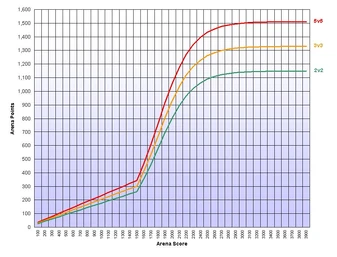 "The transformation from your Team Rating to Arena Points starts off as a linear function, but once you go beyond a certain rating threshold, the function becomes logistic. This means that you will see a significant payoff increase once your Team Rating goes beyond a certain point, but the high-end spectrum of the ratings will eventually notice a decrease in how much bang they get for their buck." You can stockpile a maximum of 5,000 Arena Points.
Formulae
On 26 September 2007, the formulae used to calculate Arena Points were changed, as outlined on the official site about WoW arena's.

Penalties:
- 2v2 teams earn 76% of the points of a 5v5 team with the same rating
- 3v3 teams earn 88% of the points of a 5v5 team with the same rating
Pay out requirements
To be awarded any points on Tuesday morning (i.e. Monday at midnight) on US servers, Tuesday night (~6:45pm server time, Oceanic, to ensure points for the week, finish your games before 4pm) or Wednesday morning (i.e. Tuesday night at midnight) for EU servers, your team needs to have fought a minimum of ten matches that week and a player must have been in at least 30% of all your matches to be eligible for that week's points (i.e. it is possible to fight only 3 matches and get points - if your team did 10 matches in total)
It is important to note that the points you receive in a given week is determined by only one team, and not by combining all your teams' points. Whichever team you are a member of that would receive the most points after accounting for Team Rating and team type becomes the sole source for your points for that week. Note that 2v2 and 3v3 teams are subject to a handicap where they receive fewer points than a 5v5 team with the same Team Rating.
Subscribe to:
Comments (Atom)
